Planning intelligence forserious kitesurfers
Forecasts, alerts, Kairos, and model confidence—built to help you decide before you leave home, not to replace your favorite session tracker.
Wyndow ships as a web application for desktop browsers, and as a native iOS app for iPhone and iPad. Plan trips on desktop web or iPad; use iPhone on the go. We do not ship Android yet; the web UI is not built for phone-sized browsers.
iOS & Apple Watch
- iPhoneNative iOS app with portrait and landscape—adaptive layouts for richer forecasts and maps on the go.
- iPadTrip research on a big screen—multi-panel views and denser forecast layouts where we show them.
- Apple WatchBeta · every planWatch-face complications for wind, swell, tide, and sun. GPS session recording on the water—syncs to your iPhone log. HealthKit on iPhone.
The product UI and Kairos are English only for now—ask and read replies in English for the best results.
Spot coverage today: Brazil, Canada, Chile, France, Germany, Great Britain, Greece, Hawaii, Israel, Italy, Mexico, Netherlands, Portugal, Puerto Rico, South Africa, Spain, United States, and Zanzibar—rapidly expanding.
Every plan · Wyndow Fusion
How Wyndow forecasts work
Forecast for this launch—not the nearest weather grid cell. Fusion is our ML-enhanced hyperlocal layer (~0.001°, about 100 m), blended with ICON-EU, ECMWF, GFS, and marine data on every tier.
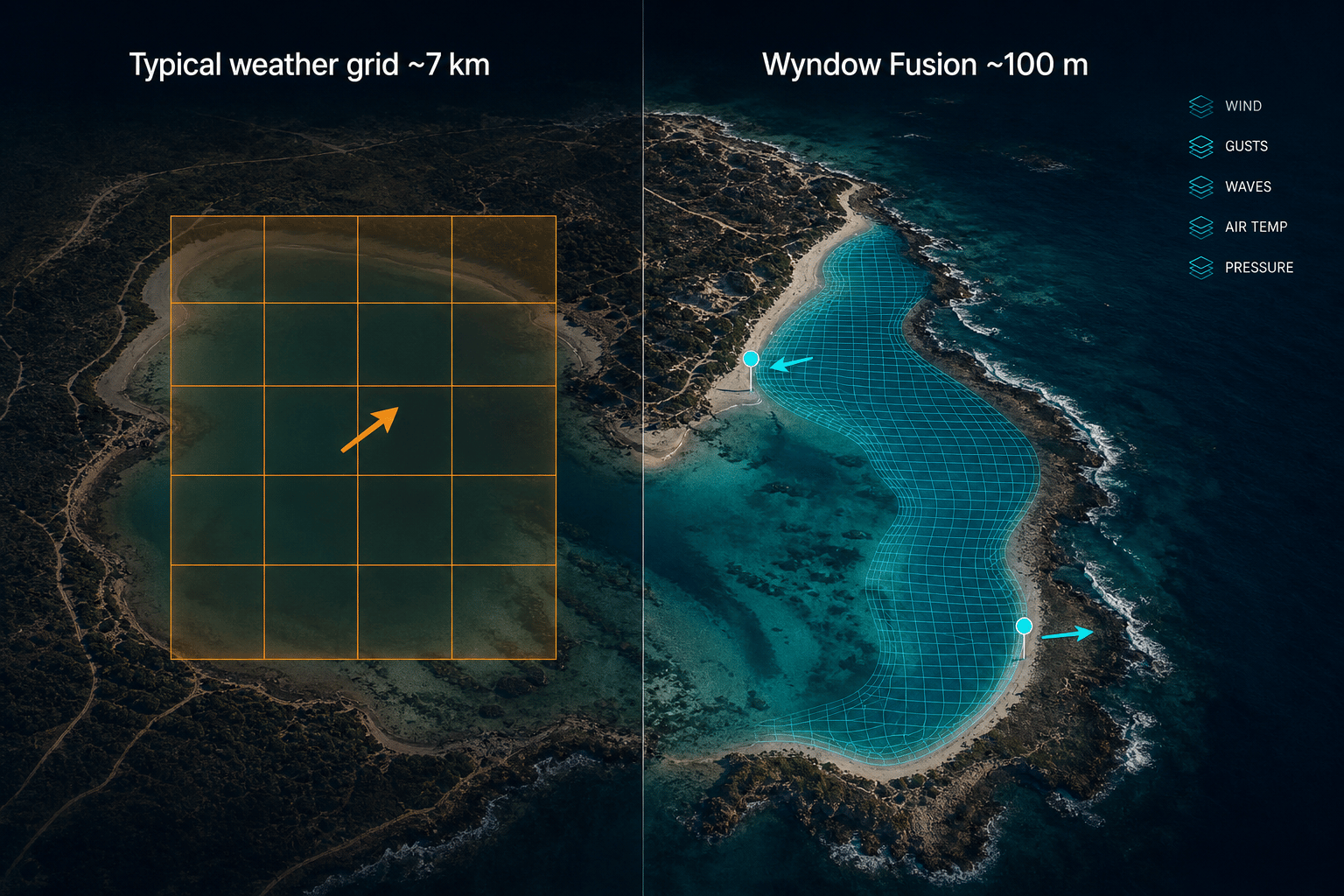
Pin-level detail
Sharpen forecasts to ~100 m where Fusion runs—wind for this launch, not one arrow for a whole bay.
Spot-level insight
North vs south side of a lagoon, launch vs inside the harbour—pins matter.
Ride with confidence
Same engine behind Observations, Narrowcast, Kairos, alerts, and widgets.
Most weather apps inherit km-scale grids from global models—one wind arrow can cover an entire bay. Wyndow Fusion adds a shoreline-aware layer where available so spot pins get detail coarse cells cannot resolve.
Wyndow does not show one global grid everywhere. For each spot we follow a country-aware model chain—Fusion plus the best-matching national and regional models (Météo-France, ICON-EU, HRRR, and more). On Navigator you can compare up to four models side-by-side and read confidence when they agree or diverge.
Finer resolution helps at the pin, but coastlines are hard—sea breeze timing, terrain, and sparse observations still dominate error at many launches. Higher grid resolution is not the same as perfect beach accuracy, and different apps blend different models, so numbers can differ hour to hour.
Start free
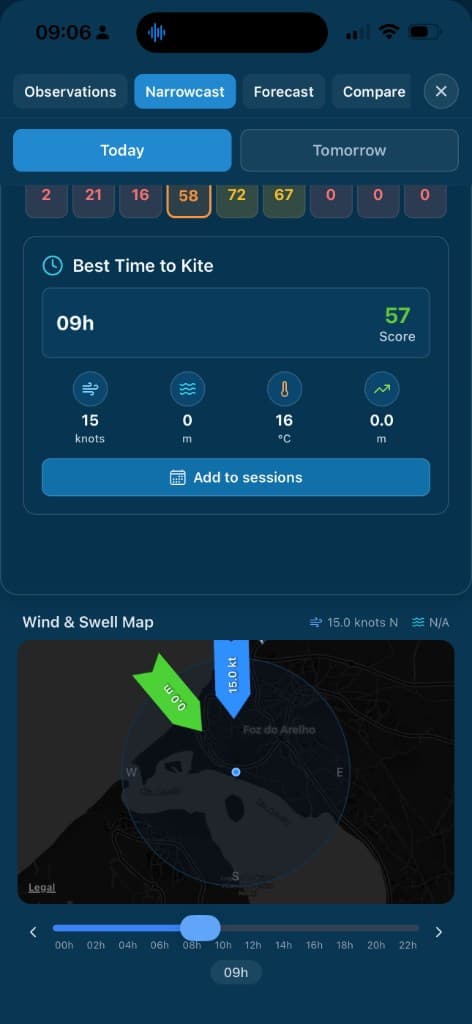
The Science Behind Perfect Conditions
Our Kite Score is built around how riders read the water: wind, waves, tides, safety, and how conditions combine at each spot—not a one-size-fits-all weather number. We evaluate multiple critical factors—and how they interact—to give you one clear score.
Wind
Speed, direction relative to shore, gust factor, and safety classification (onshore to offshore)
Waves & Swell
Height, period, and swell direction relative to the spot
Wind-Swell Combination
Wind and swell direction together make or break a session. We score how they interact—cross-onshore wind with onshore swell is the sweet spot at most spots—so you see when the combo is right, not just wind or waves alone.
Temperature
Air and sea temperature comfort
Sky Conditions
Visibility and precipitation
Tides & Currents
Hourly tide curves in Narrowcast and Forecast; tide-dependent spots use spot-specific height and coefficient preferences in the score—not just a generic wind number.
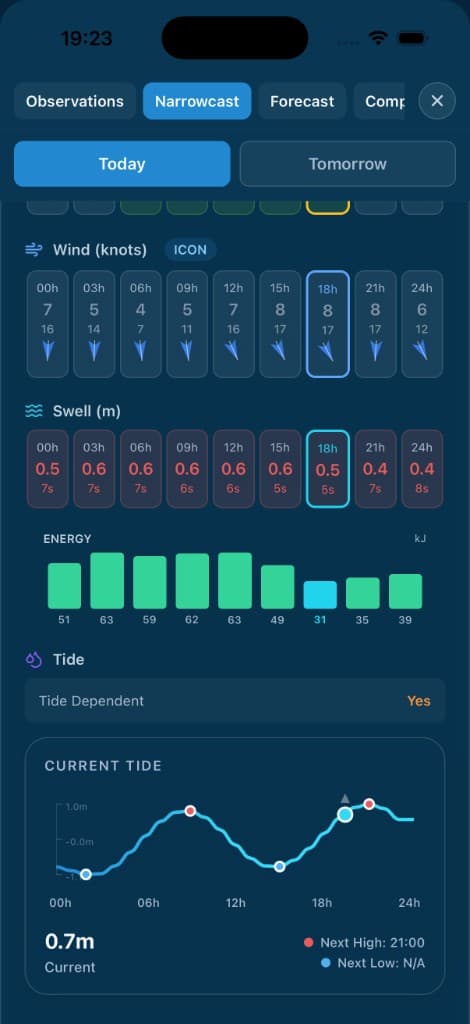
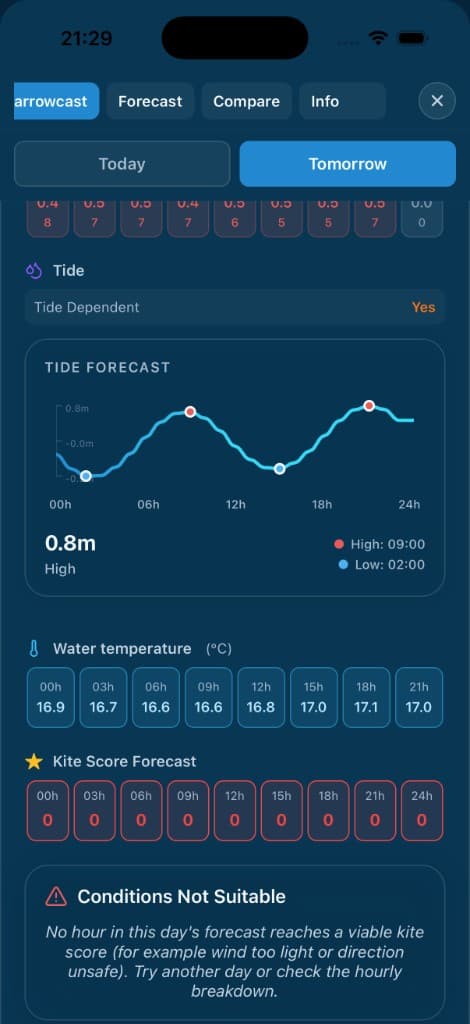
Narrowcast + tideWind, swell, and current tide in one scroll—next high/low on the waveform.
Score Ranges
Key Rule:If wind is below 10 knots, the score is automatically 0—because kitesurfing simply isn't possible without sufficient wind.
Example Queries
“Find kitesurfing spots within 2 hours with 20 knots of wind”
Gets instant results with drive times
“What's the forecast for Tarifa tomorrow?”
Detailed forecast with kite score
“Alert me when wind is above 15 knots at my favorite spot”
Creates smart alert automatically
“Compare conditions at Tarifa and Fuerteventura”
Side-by-side comparison
Your Kitesurfing Weather Expert
Kairos is our AI-powered assistant that understands kitesurfing language. Ask questions naturally and get instant, personalized answers. Explorer includes Kairos within your country groups; Navigator adds worldwide access, trip ranking, and model-compare context in chat. Kairos is English only—the model, safety tooling, and prompts are tuned for English input and output.
Natural Language Understanding
Speak naturally, no need to learn commands
Multi-Turn Conversations
Follow-up questions and context awareness
Personalized Recommendations
Based on your skill level and favorite spots
Voice Input & Output
Use voice in the app when your hands are busy—at the beach, rigging, or checking the line— with spoken replies.
Get Notified When Conditions Are Perfect
Never miss perfect conditions again. Our smart alert system goes beyond simple wind speed notifications.
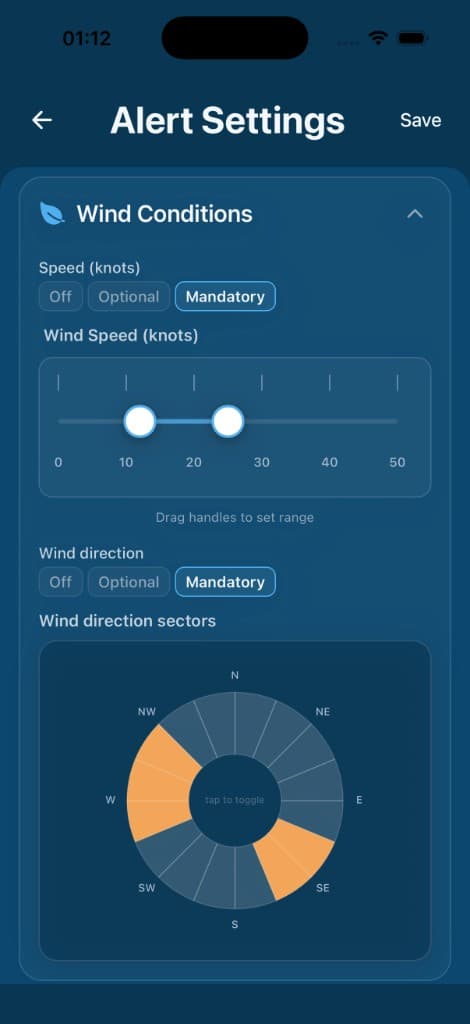
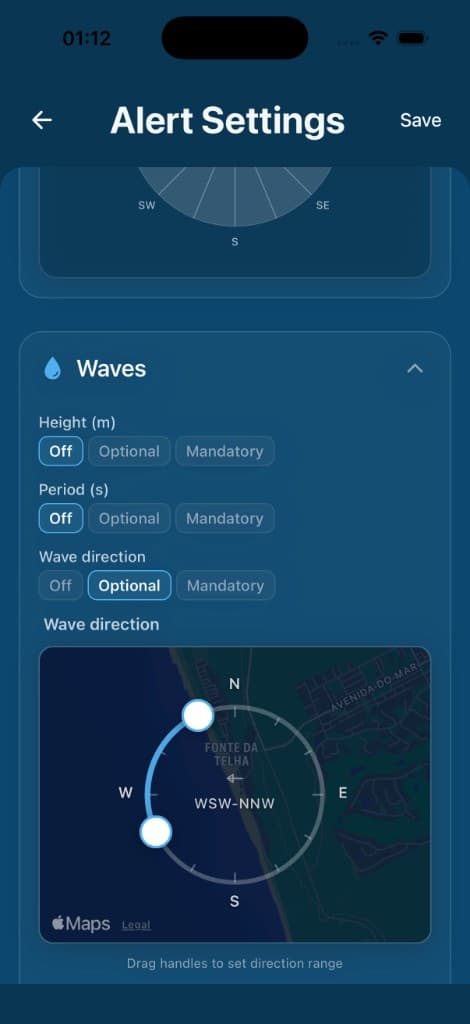
Wind alertsSet speed ranges and pick direction sectors—mandatory or optional per dimension.
Condition-Based Alerts
- Wind speed range and direction sectors—each Off, Optional, or Mandatory
- Wave height, period, and direction on a map compass at the spot
- Sky conditions (cloud cover, precipitation, visibility)
- Tide conditions (for tide-dependent spots)
Intelligent Timing
- Get notified when to leave, not just when conditions are good
- Considers your drive time to each spot
- Time windows for when you're available
- Day filtering for weekends vs weekdays
Example Alert:
Set an alert for “wind above 18 knots, within 1.5 hours drive, weekends only” and get a notification Friday evening telling you to leave Saturday morning at 7am to catch perfect conditions at 9am.
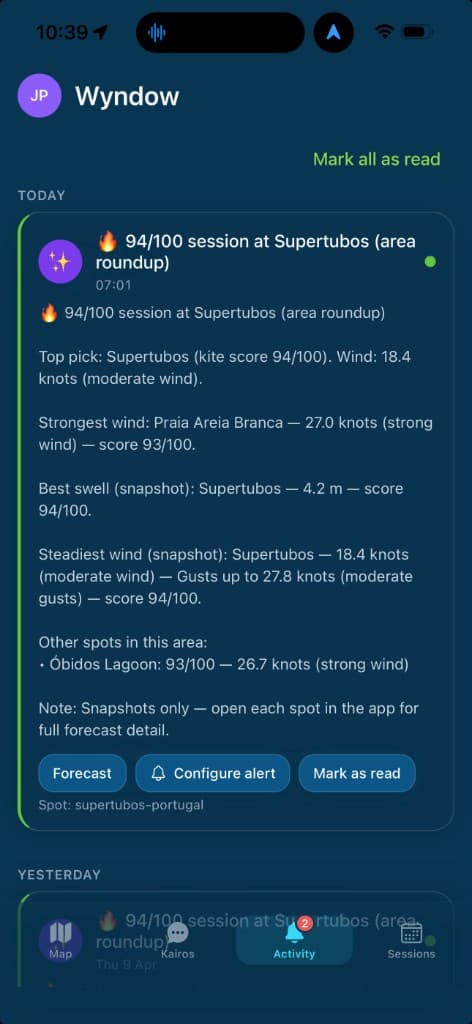
Smarter digests (Explorer & Navigator)
On Explorer and Navigator, alerts can go beyond single pings. Turn on smart forecast summaries to combine multiple matching forecast days into one clear notification per alert. Optionally add a regional digest for a periodic roundup of conditions across nearby spots around your area—handy when you are choosing where to ride. Both are optional in your alert settings.
Local tier keeps straightforward per-match alerts (no multi-day summary or regional digest).
Alert rules by plan
Each enabled rule watches your conditions at a spot. Limits apply to how many rules you can have on at once:
- LocalUp to 2 enabled rules
- ExplorerUp to 10 enabled rules
- NavigatorUp to 22 enabled rules
Sessions: GPS tracks & calendar
Plan against the forecast, record your ride on the water, then review a GPS track on a map with distance and duration—tied to the spot you rode. A private logbook, not a jump leaderboard.
- •GPS on Apple Watch (recommended): record on the water, sync to iPhone, review your color-coded line on a map with distance and duration.
- •Planned sessions (iPhone): save an upcoming window—spot, time, and forecast context—then add it to your calendar or subscribe to a private ICS feed. The watch Next session complication shows a countdown on your wrist.
- •Optional iPhone-on-board GPS for riders who mount a sealed phone—experimental; review setup and cautions in the app before riding with a phone on board.
- •Share a session card when you want—your track preview, on your terms
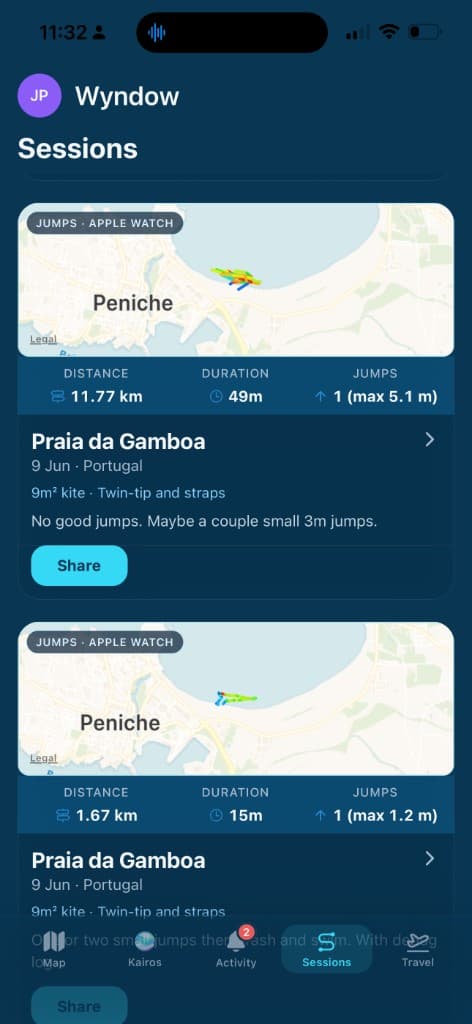
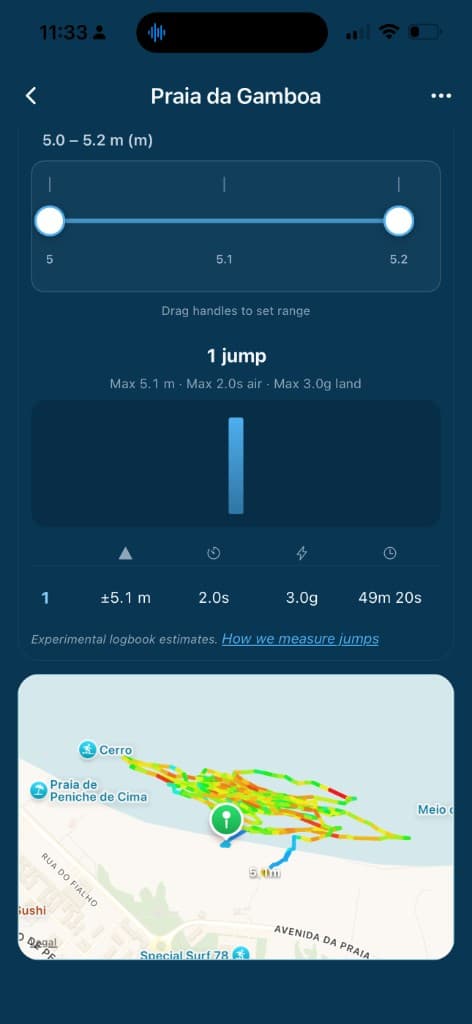
Session logEvery ride on a map—distance, duration, spot, and gear. Your private logbook.
Session list · GPS track map · Every plan
iPhone on-board recording
Mounting your iPhone on the board is optional and experimental. Apple Watch GPS is the safer default on the water—review cautions in the app before riding with a phone on board.
Apple Watch companion (beta)
Included on Local, Explorer, and Navigator—weather on your wrist plus session tools that connect back to iPhone. Pair the watch app once, then choose which favorites sync (limits depend on your plan).
- •Complications: Wind, Swell, Tide, Sun, Next session, and Start session—tap for detail or to record.
- •Weather at favorites: pick a watch-face default spot; browse other synced favorites in detail views without changing the complication.
- •Sessions: plan on iPhone, glance Next session on your face, or record GPS on the watch and send the log to your phone.
- •Complications on the go: on Wi‑Fi or cellular (GPS + cellular models), refresh watch-face weather without the iPhone app open—optional Wi‑Fi-only mode in watch Settings. Sessions sync to iPhone for review.
- •Leave-water reminder: optional countdown before you need to get off the water—strong haptic bursts on your wrist, snooze or dismiss from the stop page. Apple Watch page.
- •HealthKit: optional sync when enabled on iPhone.
Synced favorites by plan
- Local: 6 saved spots · 3 on Apple Watch
- Explorer: 12 saved · 6 on watch
- Navigator: 24 saved · 12 on watch
Sign in on iPhone once, then the watch can refresh over Wi‑Fi or cellular. Open the phone app after changing Spots to sync if the catalog does not update right away.
Visual Spot Discovery
Explore curated kitesurfing spots on fast, interactive maps—today across Brazil, Canada, Chile, France, Germany, Great Britain, Greece, Hawaii, Israel, Italy, Mexico, Netherlands, Portugal, Puerto Rico, South Africa, Spain, United States, and Zanzibar, with coverage rapidly expanding. Markers show kite scores at a glance; open a spot for rich forecasts, tides, and detail—without a separate weather overlay on the map.
Map Features
- •All spots marked with current kite scores
- •Rich spot & forecast panels (wind, waves, tides, scores) when you select a marker
- •Color-coded conditions (green = excellent, yellow = good, red = poor)
- •Click any spot for instant forecast
- •Filter by kite score, distance, or conditions
Spot Information Available
Kite Scores
Current & forecasted
Wind Data
Speed & direction
Wave Conditions
Height, period, direction
Temperature
Air & sea
Tide Info
Height & coefficient
Drive Time
From your location
Models we fuse together
Fusion is the hyperlocal layer above; below is the global and regional backbone Wyndow blends for each spot.
Global backbone
DWD ICON & ICON-EU
- ~7 km over Europe (ICON-EU)
- ~13 km global ICON
- Updated every 3 hours
- Up to ~7-day range
ECMWF IFS
- ~9 km global HRES
- Global coverage
- Updated twice daily
- Up to 15-day range
NOAA GFS
- 0.11°–0.25° grids
- Global coverage
- Updated 4× daily
- Up to 16-day range
Regional & national models
France & overseas
Météo-France
- AROME ~1.3–2.5 km (short range)
- ARPEGE 0.1° Europe / 0.25° global
- AROME-OM for Antilles, Réunion, Polynesia, and more
- Official API when configured; Open-Meteo fallback
Temporarily unavailable
IPMA & AEMET
- IPMA — Portugal (official institute API)
- AEMET — Spain (official beach/coastal API)
- Not exposed in Wyndow today
- Iberia instead uses Wyndow Fusion, ICON-EU (Portugal) or ICON(Spain), plus ECMWF & GFS
UK Met Office & Nordics
- UKMO — UKV ~1.5 km over the UK
- MET Norway — Nordic/HARMONIE ~2.5 km
- HARMONIE (KNMI, DMI) — Netherlands & Denmark
North America
- HRRR — ~3 km CONUS, hourly
- NAM — ~3 km CONUS
- NBM — blended ~2.5 km CONUS
Italy, Canada & Pacific
- ItaliaMeteo — COSMO/HARMONIE ~2.2–2.5 km
- GEM — Canada (HRDPS ~2.5 km)
- JMA MSM — Japan ~5 km; ACCESS — Australia
More on Navigator
- ECMWF AIFS, GFS GraphCast (experimental)
- Finer GFS grids (0.13° / 0.25°)
- Compare agreement & confidence scores
Marine & waves
Copernicus Marine
- Wave height & period
- Sea surface temperature
- Currents where available
- Updated daily
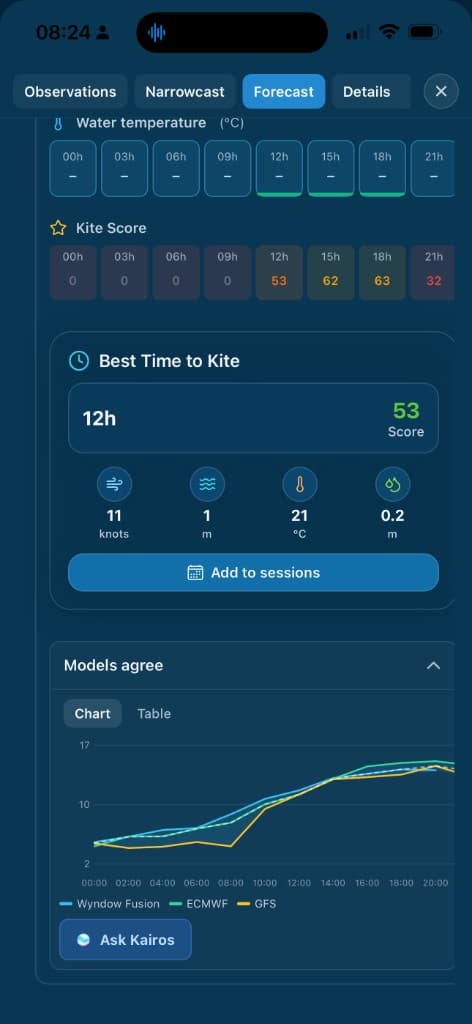
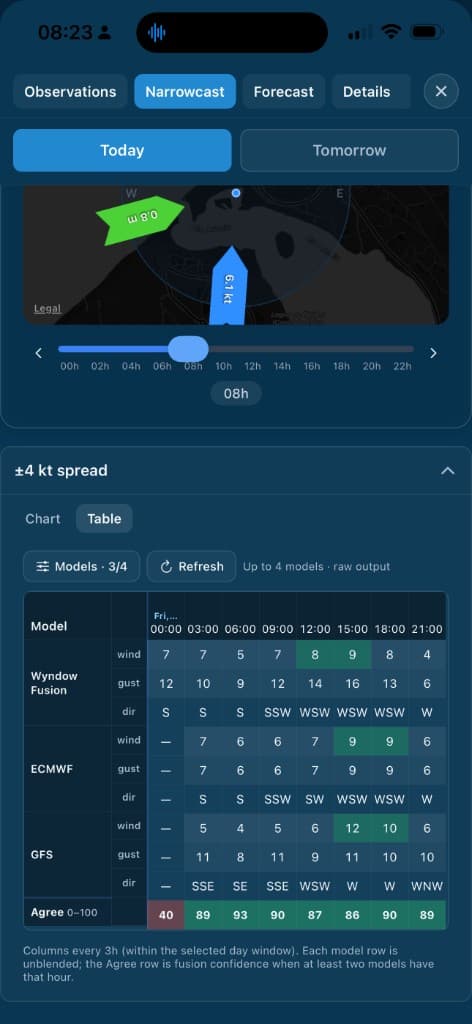
Model spreadWyndow Fusion, ECMWF, and GFS on one chart—see spread and when models agree before you commit to a session.
Models agree · Chart & table · Navigator
Navigator
Compare models & read agreement
The Models agree panel puts Wyndow Fusion, ECMWF, GFS, and more on the same timeline—chart or table—so you see spread, bias, and outliers instead of a single blended line alone. Wyndow also surfaces a confidence score from model agreement: it moves up when the underlying models tell a similar story, and down when they disagree.
Ready to Experience These Features?
Start free with Local, or pick Explorer or Navigator when you're ready.